
Instagram always has an eye on accounts that have some suspicious activity so it could hunt down on such profiles that are ruining the platforms’ engagement.
And it is for this reason it has rolled out various security checks to safeguard its user’s privacy and flag the spammy ones.
Be it verifying it via a security code, or user’s cell number, there have already been many tools that Instagram made use of to counter such problems.
However, when there are solutions to a problem, there also exist bypasses which are nothing new in this Internet era.
And it is for this reason that even a 6th grader is able to bypass the security check via fake email, or cell numbers.
While these approaches when didn’t deliver the expected results to hunt down on spammy accounts, Instagram came up with a new technology that was new to social platforms.
Can you guess?
You are right, my friend!
It’s the ‘Instagram’s Video Selfie Verification’!
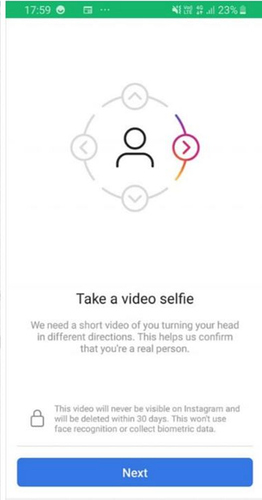
Although the feature was rolled out in August last year, the effect seems to have occurred just a month ago when a number of accounts were hit by this shield.
Almost hundreds and thousands of accounts were affected including mine so you can rest assured that I know what mistake did I do, and what you should not.
Since I keep on hunting for more information regarding Instagram, I test a lot.
And when I say ‘a lot’, I seriously mean ‘a lot’.
Every service or site or app that I see a user using, intrigues me to dig deeper into the functionality.
And that’s where I made mistake.
I recently downloaded an app that showed the followers who unfollowed me within a week and also showed the Instagram users who didn’t follow me back.
Furthermore, there also existed an option to remove all of them via a single click.
But wait…
It turned out to be a disaster for me.
Although I don’t use my personal account for testing purposes rather I prefer the fake ones, I seriously thought that I permanently lost my account.
As per the current guidelines and rules of the platform, Instagram doesn’t want its users to use any third-party application.
And since I logged in via a third-party application, and unfollowed many users who didn’t follow me back, it flagged my account into suspicion zone.
The next day, when I logged into my account, Instagram asked me to verify my account via a video selfie.
Since I had no bad intentions (such as spamming) and I used it just for testing purposes, I proceeded further to the verification part and uploaded my video selfie.
Just followed the instructions which the platform mentioned and it was all very smooth to record.
However…
When I clicked on the upload button to upload my video selfie, the platform showed an error.
I did it again…
And it was all same!
I searched online and I bumped into several videos that claimed that I would get back my account with their supernatural trick (that even NASA didn’t know).
All fake though!
None of those tricks in those videos worked.
I logged out and logged in again.
I cleared the app’s cache.
I even rebooted my device.
But as I said, all in vain!
In frustration, I deleted my app and reinstalled the main app from the app store.
I did it again!
And…
Ta-da!
It worked!
I got my account after 3 hours and 56 minutes without any issue.
It all worked fine, with no restrictions, no issues.
So you may want to ask now-
How long would it take for me (YOU) to get back my account?
You see…
It depends on how serious your issue is and why the ban was imposed.
If your account is flagged under suspicious activity and has a bad record, chances are you might not get it back even up to a week or more.
And if you are new or it’s the first mistake like me, you would get back your account within few hours for sure.
Don’t stress much, just uninstall the entire app and install it again and keep trying two to three times a day.
Note- If you are using the lite version of the app, the issue won’t be solved. You would need to install the main app to complete the verification process.
Moreover, there is no need to worry as the video that Instagram receives from you gets deleted from the app after the verification completes within 30 days.
So you have nothing to worry, your video won’t be saved anywhere, neither it will be shared with any third-party apps or services.
And just for your knowledge please keep away from what I am mentioning below if you want to keep your accounts safe because you would face serious issues if you-
1- Use a badly programmed bot such as FollowingLike (you will get caught for sure!)
2- Keep logging into any third-party applications. (if it’s once, it’s fine, but not every time).
3- Mass ‘Unfollowing and Following’.
4- Posting too often (more than 5-7 posts a day is a big ‘NO’, except meme pages)
5- ‘Commenting and Liking’ every post.
Stay away from these five, and you are good to go then:)
So…
That is it for today!
Share this post if you found it helpful and let me your queries in the comments down below if you have any.
Till then?
See you next time!
Bye-bye.
Also…
P.S.- Please subscribe to our newsletter so you never miss any updates.
Hi! This exact thing is happening to me right now, for the same reason I think. I also had installed a 3rd party app and I unfollowed probably 45 people last week. J have been working on it all day, I tried uninstalling and reinstalling and clearing data and cache a few times and no luck. Im wondering, when it eventually worked for you – did you have tk do the sekfie video and tben it eventually worked when you clicked submit? Or it eventually just worked and allowed you to log in like normal? Im so worried about losing my account!
Hey Amanda,
Sorry for late reply!
The problem that I faced was just the submission after clicking the video selfie. However, I was able to submit my video selfie after I did the steps I mentioned in the video.
So yeah, submitting the video selfie for verification is a must.
By the way, don’t worry, you would get back your account after the submission succeeds.
You won’t be able to log in until you submit it.
hi ! i am having problem in video selfie verification when i am opening the app its showing couldnt verify feed and then video selfie verification window does not come a blank white screen occurs ,i cleared data and cache but nothing happened ! verification screen is not coming so please help me get my account back !
Hey,
There could be some bug in this case. Please uninstall the app, and wait for some time (one or two hour) and install it again. I know a couple of my friends who did this and it worked.
Also, make sure you are not using the lite version of the app.
P.S.- These are just the methods which could eliminate the possible issues, if the ban was imposed for some serious breach, it could take some time, so please be a little patient.
Let me know if you have any further issues!
Is Casinacho Casino Worth It for Canadians? Honest Review 2026. Casinacho Casino has been gaining popularity among Canadians in recent years, but is it really worth it? In this honest review, we will take a closer look at the casino casi-casinacho.ca and its offerings to help you decide if it is the right choice for you in 2026. Casinacho Casino is an online gambling platform that offers a wide range of games, including slots, table games, and live dealer games. The casino is known for its sleek design, user-friendly interface, and generous bonuses and promotions. One of the things that sets Casinacho apart from other online casinos is its commitment to providing a safe and fair gaming environment for its players. When it comes to game selection, Casinacho has something for everyone. Whether you are a fan of classic slots, modern video slots, or table games like blackjack and roulette, you are sure to find something that suits your preferences. The casino also offers a variety of live dealer games, where you can interact with real dealers and other players in real-time. In terms of bonuses and promotions, Casinacho does not disappoint. The casino offers a generous welcome bonus for new players, as well as regular promotions and loyalty rewards for existing players. These bonuses can help boost your bankroll and enhance your overall gaming experience. One of the things that sets Casinacho apart from other online casinos is its commitment to player safety and security. The casino uses state-of-the-art encryption technology to ensure that all player data is kept safe and confidential. Additionally, Casinacho is licensed and regulated by the Malta Gaming Authority, which means that it operates in accordance with strict standards and regulations. Another thing that sets Casinacho apart is its customer support team. The casino offers 24/7 customer support via live chat, email, and phone, so you can always get help whenever you need it. The support team is knowledgeable, friendly, and responsive, ensuring that any issues or questions you may have are addressed promptly. Overall, Casinacho Casino is definitely worth considering for Canadian players in 2026. With its wide range of games, generous bonuses and promotions, commitment to player safety and security, and top-notch customer support, Casinacho offers a complete and enjoyable gaming experience. Whether you are a seasoned player or just starting out, Casinacho has something for everyone. So why not give it a try and see for yourself?